
Giving access to a Calendar delegate to manage categories
T
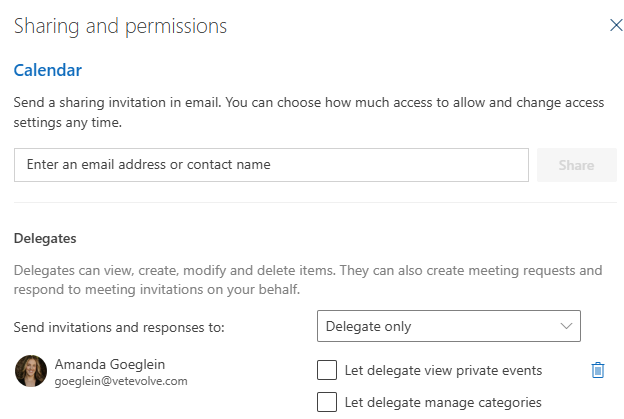
o give someone delegate access and let them manage categories in Outlook, use the Microsoft Outlook sharing settings. Go to your calendar, select Share Calendar, add the person's email, choose Delegate access, and check the box for Let delegate manage categories. [1]
New Outlook / Web Instructions
Open Outlook on the web or the new Outlook app.
Go to Calendar and click Share Calendar on the Home tab.
Type the name or email address of your delegate.
Change their permission drop-down to Delegate (Editor level rights).
Classic Outlook (Desktop) Instructions
Click File > Account Settings > Delegate Access.
Click Add and select the person you want as your delegate, then click Add and OK.
Set their permission level to Editor for the Calendar or relevant folders.
(Note: Full category list creation in classic desktop may require explicit Editor/Owner folder permissions or Exchange admin rights on the shared mailbox items)
No Comments