
BETA: Using Redirector Extension for Service Channel SSO redirection
This is a draft article - we are still testing. Please provide feedback to the IT team as we enhance these instructions.
We have implemented Single Sign-On or SSO to help facilitate faster logins and enhance secure access to our Service Channel instance. However, the emails we receive from Service Channel have a URL that points to the general Service Channel page instead of the VetEvolve custom page.
We have found a way to work around this is to use a browser add-in called Redirector that when configured correctly will help redirect to the correct login page for VetEvolve and then continue to the original page you requested once the SSO process is complete.
Note - these instructions are currently only for Windows users using Microsoft Edge or Google Chrome browsers. We may have a different solution for Safari on Mac OS devices if needed - but will likely point to a separate set of instructions. The add-ins for Edge and Chrome should work on a Mac device as long as either one of those is set as the default browser.
Below are the steps to implement the Redirector add-in.
- First - determine what your default browser tied to your email app is. The easiest way to do this is to click on a link within your email. Whichever browser opens the link is your default browser.
- For Microsoft Edge:
Browse to the Redirector Addons page here: Redirector - Microsoft Edge Addons
For Google Chrome:
Browse to the Redirector Chrome Store link: Redirector (extenhub) Chrome Store
There are several add-ins called Redirector in both stores. Use the ones via the links above and make sure the logo looks like the R drawn with an arrow like below

- Add the extension/add-in to your browser.
- Once the add-in/extension is installed, you will need to configure the redirects. Open the extension settings and you should see the default screen similar to this:
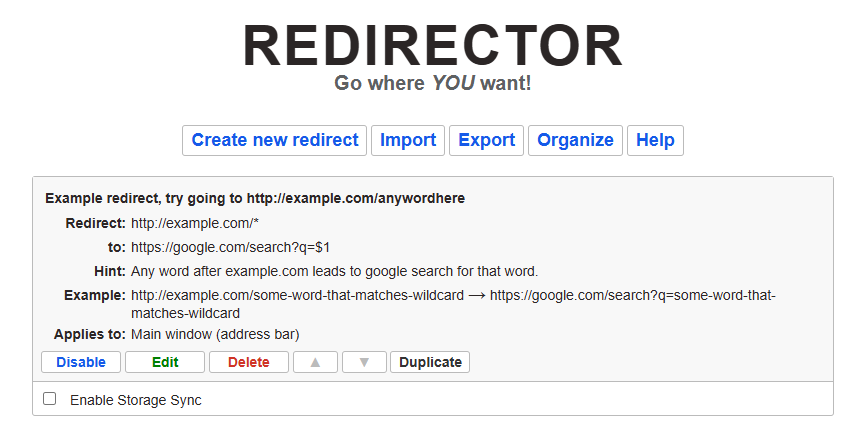
- You don't have to create any new redirects - you can just import the three we have to help facilitate the redirect to Service Channel.
Download this file: VetEvolveServiceChannelRedirector.json - Then within the Redirector interface - click the Import button and then browse to the
- If successful you should see the following:
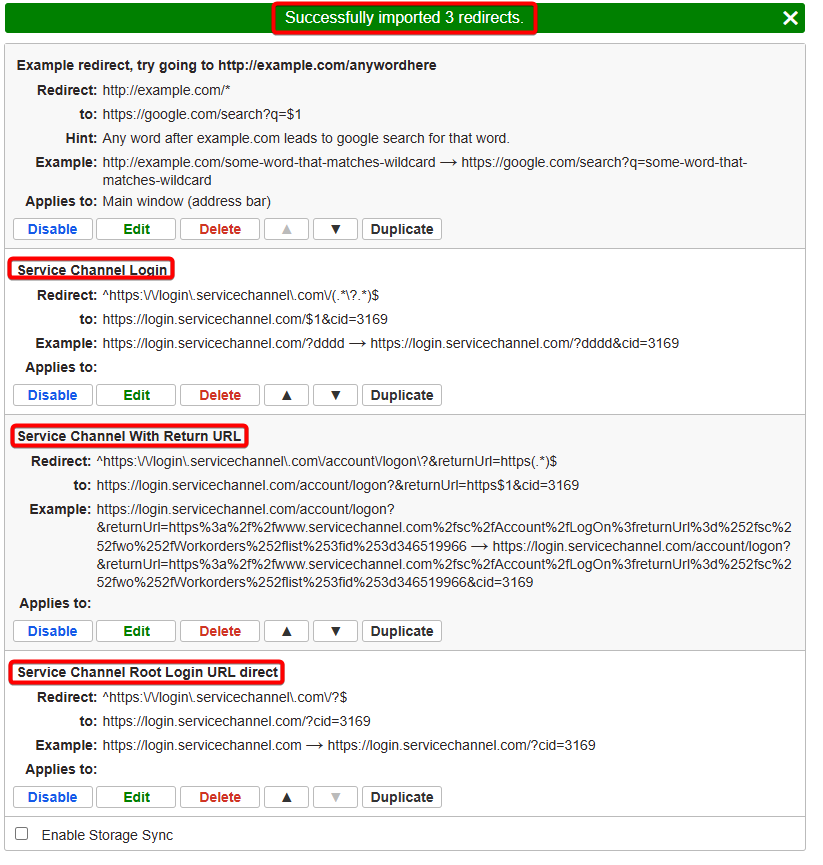
-
Now as long as this redirector add-in is active, Service Channel links should redirect you to the SSO page if you aren't already signed in to Service Channel.

No Comments